Virtual First Officer
Your First Officer performs flows, responds to checklist items, operates supported aircraft systems, and assists throughout the flight.
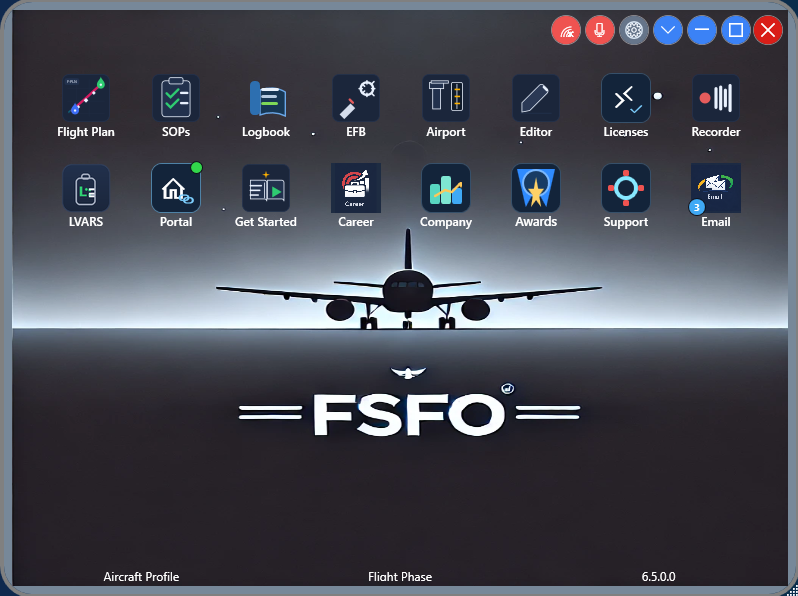
A complete virtual crew and operations experience for Microsoft Flight Simulator.
Your First Officer performs flows, responds to checklist items, operates supported aircraft systems, and assists throughout the flight.
Speak naturally to your First Officer or let FSFO automatically handle supported tasks such as gear, flaps, and heading, speed or altitude - plus more! FSFO uses Microsoft Speech Recognition for voice commands and requires an English language pack to be installed, as all voice commands must be spoken in English.
Customize procedures, crew roles, flows, checklists, trigger points, responsibilities, and automation behavior.
Cabin-crew functionality including boarding, safety demonstrations, turbulence announcements, time-of-day-aware crew messages, takeoff and landing preparation, plus the optional AI Cabin Crew.
Integrated pushback and Runway Awareness and Advisory System (RAAS) functionality, including runway-awareness advisories and operational callouts.
Flight planning, weather, gate information, operational messages, and other dispatch-style functionality, with the optional AI Operations Center and operational data sources such as SayIntentions and VATSIM.
Fly for an airline, track your career, earn awards, or operate your own virtual company.
Aircraft integration varies by aircraft and developer. Review the compatibility and limitations for your aircraft below before purchasing.
All sales are final. Refunds are not issued except where required by applicable law.
Aircraft developers expose their systems differently. As a result, FSFO's ability to monitor and control individual aircraft systems varies by aircraft. FSFO does not select SIDs, STARs, approaches, or runways; unsupported entries must be completed manually. Review the information below before purchasing a profile.
| Aircraft | Developer | FMS / CDU Programming |
Flight Plan Must Be Loaded via EFB |
Full Voice Integration |
Known limitations / notes |
|---|---|---|---|---|---|
| Aerosoft CRJ V2 | Aerosoft | ✓ | ✓ | ✓ | The SimBrief route must already be loaded through the aircraft EFB before FSFO begins CDU programming. |
| Asobo ATR 42 / 72 | Asobo | × | ✓ | FSFO does not program ATR FMS routes, procedures, or performance data. | |
| FlyByWire A32NX | FlyByWire | ✓ | ✓ | Very high level of integration. | |
| FBW A380 | FlyByWire | × | ✓ | FSFO cannot program the MCDU. Import the SimBrief flight plan through the aircraft EFB, then complete any remaining entries manually. | |
| Fenix A320 | Fenix Simulations | ✓ | ✓ | Very high level of integration. | |
| FSS ERJ | FlightSim Studio | × | ✓ | FSFO cannot program the CDU. Use the aircraft's own copilot, route-import, or performance-entry feature where available, then complete any remaining entries manually. | |
| FlightFX C750 | FlightFX | × | ✓ | FSFO cannot program the CDU. Use the aircraft's own route-import or performance-entry features where available, then complete any remaining entries manually. | |
| iniBuilds A220 | iniBuilds | × | ✓ | FSFO can set autopilot selections but does not program the FMS. External Power may not always engage automatically. | |
| iniBuilds A300-600R | iniBuilds | ✓ | ✓ | ||
| ini A310 | iniBuilds | ✓ | ✓ | ||
| ini A320-200 / Neo | iniBuilds | ✓ | ✓ | ||
| ini A330-200 / 300 | iniBuilds | ✓ | ✓ | ||
| ini A340-300 / 600 | iniBuilds | ✓ | ✓ | ||
| ini A380 | FlyByWire | × | ✓ | FSFO cannot program the MCDU. Import the SimBrief flight plan through the aircraft EFB, then complete any remaining entries manually. | |
| ini A350 | iniBuilds | × | ✓ | FSFO cannot program the MCDU. Import the SimBrief flight plan through the aircraft EFB, then complete any remaining entries manually. | |
| PMDG 737 | PMDG | ✓ | ✓ | ✓ | The SimBrief route must already be loaded through the aircraft EFB before FSFO begins CDU programming. |
| PMDG 777 | PMDG | ✓ | ✓ | ✓ | The SimBrief route must already be loaded through the aircraft EFB before FSFO begins CDU programming. |
✓ = Supported / required × = Not supported Blank = Not required / not applicable
FSFO requires FSUIPC7 to communicate with Microsoft Flight Simulator and supported aircraft. The free version of FSUIPC7 is sufficient; a paid FSUIPC license is not required.
FSFO does not replace the aircraft itself and cannot control systems that the aircraft developer does not expose to third-party applications. Functionality therefore varies by aircraft. Review the aircraft-specific limitations above before purchasing.
Want even more control? Advanced users can use FSFO's LVAR functionality to read and manipulate aircraft variables directly, enabling custom automation and additional aircraft-specific control.
FSFO was built around a simple philosophy: value. New features are added as the product grows, while existing features can be customized to fit how you fly. Check for updates regularly.
If you are unsure whether a specific FSFO function is supported on your aircraft, ask us before purchasing.
MORE FSFO CAPABILITIES
On supported aircraft, FSFO completes most CDU or MCDU setup after your SimBrief plan is loaded. You select departure and arrival runways, SIDs, STARs, and approaches.
Have your copilot start boarding, request catering and pushback, confirm engine start, and manage fuel, baggage, and jetway services through voice, buttons, routes, or the Operations Center.
FSFO verifies supported systems, waits at checklist items until they are set, and delivers operational callouts and readbacks for engines, gear, flaps, runway alignment, and autopilot targets.
Set your own thresholds for gear, flaps, autopilot, seatbelt signs, and ground-service timing. Prefer to fly hands-on? Use voice commands with Push-to-Talk or Open Mic.
Track aircraft type, landings, and averages in the logbook. RAAS provides runway-entry, remaining-runway, unstable-approach, long-takeoff, and long-landing awareness alerts.
Choose from HD regional voice packs and optional Windows SAPI voices for the pilot, copilot, and cabin crew. Download more regions or record your own custom sounds.
FSFO IN ACTION
Review the aircraft compatibility and limitations above, then visit the FSFO store when you're ready.