Share the workload
Your first officer runs aircraft-specific flows, operates supported controls and reads checklists with you from cockpit preparation to shutdown.
MEET FLIGHT SIM FIRST OFFICER V7
Run aircraft-specific flows, call out checklist answers and hand supported cockpit tasks to your copilot in Microsoft Flight Simulator.
Your first officer runs aircraft-specific flows, operates supported controls and reads checklists with you from cockpit preparation to shutdown.
Adjust procedures, decide who handles each task and choose how much to automate. Take over an item whenever you need to.
Give spoken commands and choose distinct voices for your copilot, cabin, ground and operations crews. Add optional AI for conversation and passenger announcements.
Prepare for departure and arrival. Bring in your SimBrief flight plan, review performance and let optional approach-speed monitoring help you spot deviations on final.
SAY IT. KEEP FLYING.
Use familiar spoken commands, or select the controls on screen. Standard voice commands and recorded crew voices work without AI.
Need a moment during a checklist? Put it on standby. When you continue, the copilot repeats the item you were working on.
Explore the V7 Voice Commands guideTRY SAYING
Set altitude twenty three thousand
Selects 23,000 feet on supported aircraft.
Set flight level three seven zero
Selects 37,000 feet on supported aircraft.
Stand by checklist
Holds the active checklist item.
Continue checklist
Repeats the held item and resumes the checklist.
Available controls vary by aircraft. The guide shows the supported phrases and aircraft limitations.
INSIDE FSFO V7
Real screens from FSFO. Select a view, then click the image for a closer look.
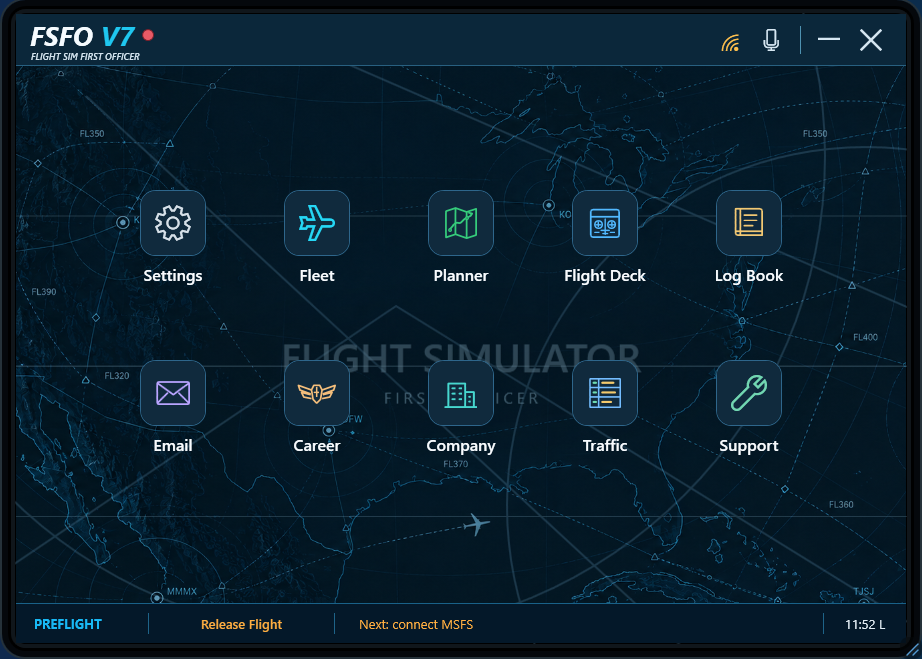
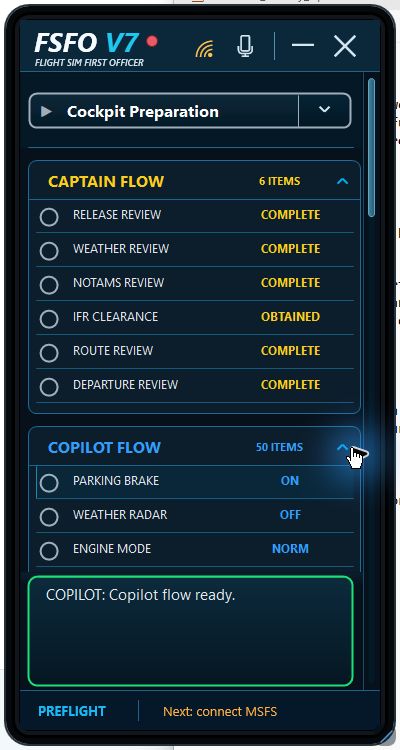
The compact Flight Deck keeps the current flow or checklist beside your instruments, where you can follow your crew without covering the cockpit.
Cockpit Preparation shown in the compact view.
OPTIONAL ARTIFICIAL INTELLIGENCE
Ask your copilot questions, make supported requests in your own words, or ask for a passenger announcement that fits the flight.
These are examples, not a fixed phrase list. You can ask other questions and request other announcements using your own words. Aircraft actions remain limited to the supported controls and procedures.
Read the AI setup walkthroughA FEW WAYS TO START
“Could you run the copilot flow?”
“What does the arrival weather mean for our flight?”
“Let the passengers know we’ll be delayed by ten minutes.”
OpenAI handles AI understanding and conversation. Cartesia provides generated crew speech. Add your own API keys for the services you use; provider usage charges are separate.
Use AI Talk for AI requests. Regular commands use Open Mic or normal Push-to-Talk and do not need an AI subscription or API key.
Fly for an airline, earn qualifications and follow your progress.
Run your own operation, manage a fleet and take on contracts.
Keep flight updates and Pilot Portal correspondence together.
See active FSFO flights worldwide or VATSIM traffic at your airport.
READY WHEN YOU ARE
The V7 guide uses real screenshots, plain explanations and examples of what to say.
Learn how to activate your aircraft, choose your crew and prepare your first flight.
MAKE IT YOURSUnderstand voice, audio, microphone, controls, AI and aircraft preferences.
KNOW WHAT TO SAYFind clear spoken examples, checklist answers and aircraft-specific restrictions.
All V7 guides and voice command PDFs are free to read. No sign-in or purchase required.
BEFORE YOU FLY
No. Standard voice commands, checklists and downloaded crew recordings work without AI. Enable AI only if you want the additional conversation and natural-language features.
No. Use the on-screen controls and choose an automatic or manual checklist mode. A microphone is needed when you want to speak commands or checklist answers.
No. Each V7 aircraft product is sold separately. Activate each aircraft you purchase from the Fleet screen using its license key and purchase email.
Available functions depend on the aircraft. The Voice Commands guide lists restrictions for each supported aircraft. You can always handle a task yourself and mark the active item completed, or use Bypass to skip it.
Each license is a one-time purchase for one aircraft. Microsoft Flight Simulator and the matching aircraft add-on are required and sold separately. Supported controls and automation vary by aircraft.
All sales are final. No refunds. Check compatibility before purchasing.